The agent stopped mid-task: subscription limits
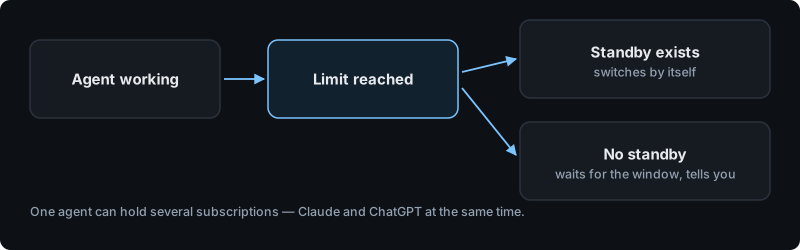
Your agent works on an AI subscription. Every such subscription has a usage limit that resets on a schedule. When the limit is reached the agent stops and resumes by itself after the reset — nothing is lost.
What exactly is a limit?
It is not a limit on messages or on hours. It is a limit on how much text the model reads and writes for you inside a rolling window. A long research task with many documents can consume as much as hundreds of short questions.
There are two windows: five-hour and weekly
The short session window resets every five hours — hit it in the morning and the agent is back by lunchtime. The weekly window resets at a fixed time once a week, assigned to your account, and will not clear before that day.
So "just wait" does not always help: if the weekly allowance is spent, the wait runs to the reset day. How much of it is gone is shown in the dashboard on the agent card, next to the active subscription, as a line like week 78%.
Why did it run out faster than last week?
Three things make a task expensive, in this order:
- Long context. Every step of a long chain re-reads everything that came before it.
- Volume of material. Reading a large file, a long chat history, or many web pages costs far more than answering from memory.
- Length of the rules you gave it. Instructions are re-read on every step, so a very long set of rules is paid for again and again. Keep rules short and about behaviour, not about individual cases.
What happens to my task when the limit hits?
The task is not lost. The agent keeps its memory and its place in the work, and continues when the window resets. If it was mid-sentence, ask it to continue.
Can I avoid waiting?
Yes — connect a second subscription and let the agent fall back to it automatically when the first one is exhausted. You can do that in the dashboard on the agent card: the top subscription is the working one, the next is the reserve. Details: connecting your subscription.
One caveat: the standby must be a separate Anthropic account. Two connections to the same account share one limit, so switching between them changes nothing — the dashboard marks such a pair as not a standby.
How do I see where the budget went?
The dashboard has a "Where the credits went" section with a breakdown by agent and by chat, and a period selector — today, 7 days, 30 days, this month, or a custom range.