Connect your own AI subscription
On the Standard plan the agent runs on a subscription that belongs to you. That is why it costs $350 per month instead of the price of the model usage on top.
Why my subscription and not yours?
Two reasons, both in your favour. You pay the model provider directly at their price, with no margin from us. And your usage limit is yours alone — it is not shared with other customers, so a busy day for someone else never slows you down.
How do I connect it?
In the dashboard, open the agent card and press Add Claude subscription. A one-time secure link to Anthropic opens: you sign in there under the account you want, copy the confirmation code and paste it back into the dashboard. The password is never typed into a chat and we never see it.
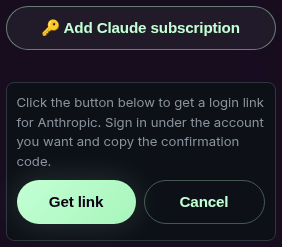
On the second step, under the code field, there is an Apply subscription to agents list. One pass can hand the same subscription to several of your agents — tick everyone who needs it.
The browser remembers the previous sign-in and the link will quietly take you into the same Anthropic account. The dashboard then tells you the key was refreshed and no new subscription was added.
Subscriptions belong to the agent, not to the account
A subscription is connected to one specific agent. With several agents, each has its own list and its own active account: connecting a subscription for one does not connect it for the rest. You can hand it to the others from the same Apply subscription to agents list while connecting.
Can I connect two?
Yes, and it is the single most useful setting on the card. The order of the list is the queue: the top subscription is the working one, the next is the standby.
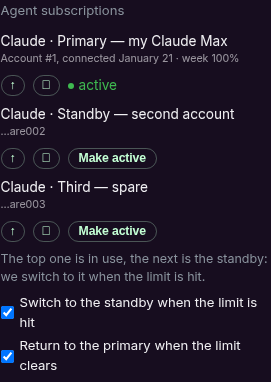
What each control does:
- Make active — move the agent onto a subscription that is already connected. No link and no code needed: the agent restarts in about a minute and carries on from where it was.
- Up arrow — move a subscription up the queue, i.e. make it the first standby.
- Cross — remove the subscription from this agent.
- Switch to the standby when the limit is hit — on hitting the limit the agent moves to the next one in the queue by itself instead of waiting for a reset.
- Return to the primary when the limit clears — once the primary's window resets, the agent goes back to it on its own.
The limit belongs to the Anthropic account, not to the connection. If both connections lead to the same account they share one quota — the dashboard says exactly that: not a standby. A standby only makes sense on a separate account.
There are two kinds of limit
A Claude subscription has two windows. The short session window resets every five hours. The weekly one resets at a fixed time once a week, assigned to your account. Next to the active subscription the list shows how much of the weekly allowance is gone: week 100% means it is spent until the reset day.
The practical difference: the five-hour window clears by itself the same day, the weekly one only on its own day. That is what a second subscription is for. More: subscription limits.
The switch shows an error. What now?
The most common cause is an expired link — each link works once and for a short time. Ask the agent for a fresh one and complete it in one go. If a fresh link fails too, that is ours to fix: report it in the customer chat and we will look at it.
Which subscription should I buy?
Buy the plan of the AI provider that gives the largest usage allowance for the money you are willing to spend — that is what your agent's stamina comes down to. Pay-as-you-go API credits are dramatically more expensive per unit of work than a flat subscription, so a subscription is the sane default.